Skip to content
Vraelis
Pricing
Sign inCreate account
Code photographed on a computer screen.

Agencies and their clients

Hand over a site you have checked

Write what the client asked for, one sentence at a time. Vraelis checks each on the live build, so the handover comes with evidence, not a walkthrough.

Start free→→See three records

The problem

The client finds it after launch

01

The brief lives in a document nobody checks

Write each line of the brief as one sentence, and Vraelis checks it on the build the client will use.

02

The demo was on your machine

Vraelis checks a public address, a preview or staging deployment, never localhost.

03

Fixes arrive without proof

After a fix, the same approved plan runs again. Send the client the re-check with the fix.

Three real checks

Three demo apps, checked for real

Lumen Notes, Notewell and a project tracker are Vraelis demo apps. Each record keeps every step and what it found, and the sentence where the run had one.

Lumen Notes

Before the fix

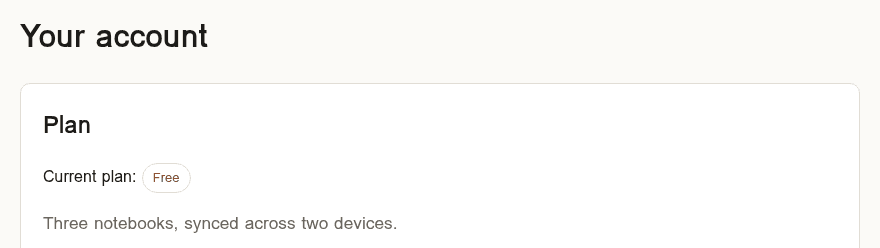
Paying worked and the account showed Pro, so it looked done. After signing out and back in, the plan was Free. A check of the payment step alone would have passed.

Outcome
Found a problem
Run ID
3fad10f5
Recorded
2026-07-22
Duration
7.6 s
Read the whole record→
The sentence, the steps and the finding
A customer can upgrade to Pro, receive access immediately, and retain Pro after signing out and signing back in.

Upgrade to Pro and verify persistence across sign-out and sign-in

  1. 01Open /pricing.html135 ms
  2. 02Click “Get Pro”468 ms
  3. 03Click “Pay”417 ms
  4. 04Open /account.html113 ms
  5. 05Check Plan shows “Pro”149 ms
  6. 06Start a fresh browser session82 ms
  7. 07Open /signin.html113 ms
  8. 08Sign in as the test customer1.2 s
  9. 09Confirm the session is signed in275 ms
  10. 10Open /account.html115 ms
  11. 11Check Plan shows “Pro”Found a problem149 ms

Step 11 of 11

Expected
Plan shows “Pro”
Observed
“Pro” was not on the page
The Lumen Notes account page after signing back in, before the fix: Current plan shows Free.

Lumen Notes

After the fix

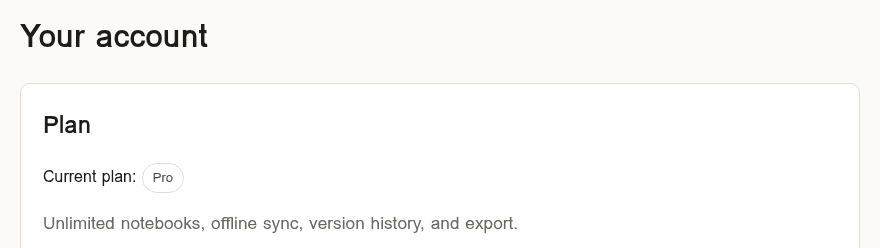
It took the same eleven planned steps as the run before the fix, and none of them found a problem.

Outcome
Did what the sentence says
Run ID
588c48f7
Recorded
2026-07-22
Duration
9.0 s
Read the whole record→
The sentence, the steps and the finding
A customer can upgrade to Pro, receive access immediately, and retain Pro after signing out and signing back in.

Upgrade to Pro and verify persistence across sign-out and sign-in

  1. 01Open /pricing.html337 ms
  2. 02Click “Get Pro”684 ms
  3. 03Click “Pay”491 ms
  4. 04Open /account.html306 ms
  5. 05Check Plan shows “Pro”164 ms
  6. 06Start a fresh browser session80 ms
  7. 07Open /signin.html269 ms
  8. 08Sign in as the test customer1.2 s
  9. 09Confirm the session is signed in261 ms
  10. 10Open /account.html119 ms
  11. 11Check Plan shows “Pro”143 ms
The same account page after the fix: Current plan shows Pro.

Notewell

The plan Vraelis wrote from one sentence had two journeys: the note has to survive signing out and back in, and the dashboard must not open for someone who is signed out. The check deleted its own test note at the end.

Outcome
Did what the sentence says
Run ID
4fc6e52c
Recorded
2026-07-31
Duration
17.4 s
Read the whole record→
The sentence, the steps and the finding
A signed-in user can create a note and still see the same note after signing out and signing back in.

Create and persist a note across sign-out and sign-in

  1. 01Open /auth1.3 s
  2. 02Sign in as the test member3.2 s
  3. 03Open /dashboard123 ms
  4. 04Type “Test note title” into Title723 ms
  5. 05Type “Test note body content” into the note225 ms
  6. 06Click “Save note”342 ms
  7. 07Check Your notes shows the title1.1 s
  8. 08Check Your notes shows the body85 ms
  9. 09Click “Sign out”340 ms
  10. 10Check the address is /auth250 ms
  11. 11Sign in as the test member again2.0 s
  12. 12Open /dashboard103 ms
  13. 13Check Your notes shows the title850 ms
  14. 14Check Your notes shows the body86 ms
  15. 15Click “Delete” to clean up the test note345 ms

Verify dashboard is gated without authentication

  1. 01Start a fresh browser session82 ms
  2. 02Open /dashboard while signed out114 ms
  3. 03Check the address is /auth0 ms
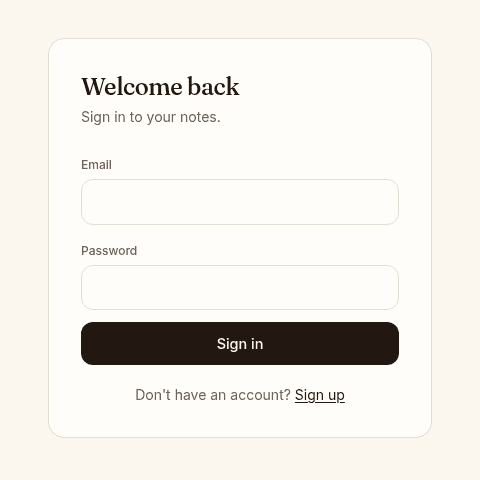
Notewell's sign-in page, where the browser was sent after opening /dashboard while signed out.

Vraelis fixture dashboard

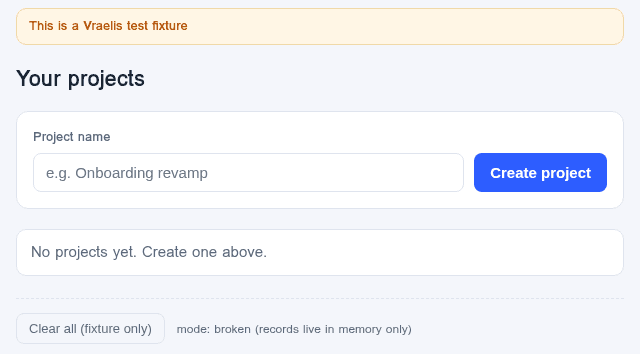
Creating the project looked fine on screen. One reload later it was gone, which is the kind of bug nobody notices until a customer does.

Outcome
Found a problem
Run ID
de53ab8b
Recorded
2026-07-14
Duration
5.0 s
Read the whole record→
The sentence, the steps and the finding
The record has no sentence, so this is the journey's recorded name.
Create a project and check it persists

Create a project and check it persists

  1. 01Open the dashboard455 ms
  2. 02Type “Test Project” into Project name326 ms
  3. 03Click “Create project”324 ms
  4. 04Reload the page191 ms
  5. 05Check “Test Project” is on the pageFound a problem123 ms

Step 5 of 5

Expected
“Test Project” is on the page
Observed
Not visible. Created data disappears after refresh.
The fixture dashboard after one reload: Your projects reads No projects yet.

How it fits

Bring the client in

A viewer seat for the client

The viewer role reads the evidence without anyone sharing a login.

Approving costs nothing

A reviewer who approves a plan is never charged for it.

One system per client

Each client's site is its own connected system with its own record.

After a fix

The same plan runs again within 24 hours, up to 10 times, on the same host.

Examples, none of these has been run yet

  1. 01

    The contact form on the home page sends, and the thank-you page shows the visitor's name.

  2. 02

    A visitor can book a table, and the confirmation page shows the date they chose.

  3. 03

    In test mode, the shop's checkout ends on an order page with an order number.

  4. 04

    Switching the site to French keeps the visitor on the same page.

It checks the live build in a browser. It does not review your code or your design.

Limitations→

Related

  • Fintech and commerce

    Checkouts and plans, checked before a release.

    →
  • SaaS product teams

    Sign-up, roles, billing and the work customers save.

    →
  • Pricing

    Listed plans, and what one verification includes.

    →

Ship the handover with the evidence

Start free→→

Product

PlatformHow a check worksWhat it can reachWhat is builtIntegrationsAI assistantsPricing

Solutions

DefenseRobotics and fleetsFintech and commercePublic sectorAI-built appsSaaS product teamsAgenciesEnterpriseAll solutions

Developers

DocumentationAPICLIWebhooksCIDevelopers overview

Resources

ResearchUse casesMethodIn publicREADMEChangelog

Company

AboutContactReddit partnershipByteDance partnership

Trust

SecurityLimitationsPrivacyCookiesTermsAcceptable useRefundsData rightsSubprocessorsTrademark

Vraelis checks whether live software does what someone says it does, and shows the evidence.

© 2026 Vraelis
Image sourcesLinkedIn