Skip to content
Vraelis
Pricing
Sign inCreate account
A person paying by card at a checkout.

Fintech and commerce

Check the checkout before every release

Write what a paying customer should get. On staging, in test mode, Vraelis buys with a test account, signs out and back in, and checks what is still there.

Start free→→See the record
What it checked
Upgrade to Pro, and keep Pro after signing out and back in
Before the fix
Step 11 of 11: “Pro” was not on the page
After the fix
Did what the sentence says, in 9.0 s
The plan
The same 11 steps, before and after

From two runs on Lumen Notes, a Vraelis demo app, on July 22, 2026.3fad10f5, 588c48f7Read the record

The problem

Paid is not the same as kept

01

Access that does not survive a sign-in

On Lumen Notes, paying worked and the account showed Pro. After signing out and back in, “Pro” was not on the page.

02

A plan change the account page never shows

Billing says one thing and the account page another. The check reads the page the customer reads.

03

A receipt that disagrees with the checkout

Totals, discounts and plan names are compared on the pages a customer sees, step by step.

A real check

After signing back in, the plan said Free

Lumen Notes is a Vraelis demo app. The same 11 planned steps ran before the fix and after it.

Lumen Notes

Before the fix

Paying worked and the account showed Pro, so it looked done. After signing out and back in, the plan was Free. A check of the payment step alone would have passed.

Outcome
Found a problem
Run ID
3fad10f5
Recorded
2026-07-22
Duration
7.6 s
Read the whole record→
The sentence, the steps and the finding
A customer can upgrade to Pro, receive access immediately, and retain Pro after signing out and signing back in.

Upgrade to Pro and verify persistence across sign-out and sign-in

  1. 01Open /pricing.html135 ms
  2. 02Click “Get Pro”468 ms
  3. 03Click “Pay”417 ms
  4. 04Open /account.html113 ms
  5. 05Check Plan shows “Pro”149 ms
  6. 06Start a fresh browser session82 ms
  7. 07Open /signin.html113 ms
  8. 08Sign in as the test customer1.2 s
  9. 09Confirm the session is signed in275 ms
  10. 10Open /account.html115 ms
  11. 11Check Plan shows “Pro”Found a problem149 ms

Step 11 of 11

Expected
Plan shows “Pro”
Observed
“Pro” was not on the page
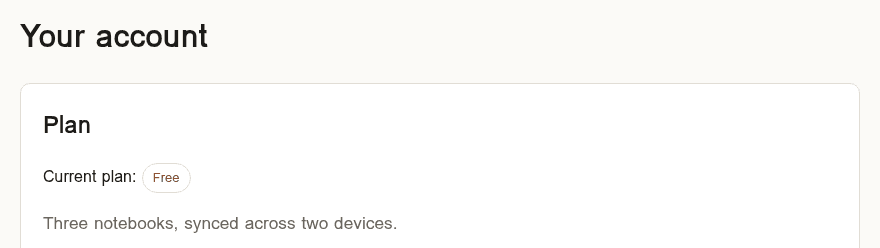
The Lumen Notes account page after signing back in, before the fix: Current plan shows Free.

Lumen Notes

After the fix

It took the same eleven planned steps as the run before the fix, and none of them found a problem.

Outcome
Did what the sentence says
Run ID
588c48f7
Recorded
2026-07-22
Duration
9.0 s
Read the whole record→
The sentence, the steps and the finding
A customer can upgrade to Pro, receive access immediately, and retain Pro after signing out and signing back in.

Upgrade to Pro and verify persistence across sign-out and sign-in

  1. 01Open /pricing.html337 ms
  2. 02Click “Get Pro”684 ms
  3. 03Click “Pay”491 ms
  4. 04Open /account.html306 ms
  5. 05Check Plan shows “Pro”164 ms
  6. 06Start a fresh browser session80 ms
  7. 07Open /signin.html269 ms
  8. 08Sign in as the test customer1.2 s
  9. 09Confirm the session is signed in261 ms
  10. 10Open /account.html119 ms
  11. 11Check Plan shows “Pro”143 ms
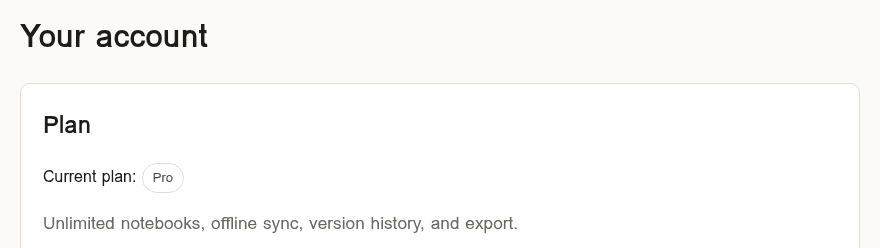
The same account page after the fix: Current plan shows Pro.

Examples, only the first was run, on Lumen Notes, and it is quoted as written

  1. 01

    “A customer can upgrade to Pro, receive access immediately, and retain Pro after signing out and signing back in.”

  2. 02

    Cancelling from Billing changes the plan to Cancelled, and Billing still shows Cancelled after a reload.

  3. 03

    A discount code applies once, and the checkout total matches the receipt page.

  4. 04

    A customer who downgrades keeps their projects and loses the Pro features.

How it fits

Built for test mode and test accounts

Test mode and test accounts

Run it on a preview or staging deployment with your payment provider in test mode, and give Vraelis a test account.

A person approves every plan

Nothing runs until someone on your team approves the exact plan. An API key cannot approve one.

The same plan after the fix

After a fix, the same approved plan runs again on the same host, within 24 hours, up to 10 times.

It sees what the customer sees, not your payment provider, and it does not certify PCI DSS or any other standard.

Limitations→

Related

  • SaaS product teams

    Sign-up, roles, billing and the work customers save.

    →
  • AI-built apps

    Apps an agent built, checked on the live app.

    →
  • A checkout that forgets

    Before the fix and after it, step by step.

    →

Know the upgrade sticks

Start free→→

Product

PlatformHow a check worksWhat it can reachWhat is builtIntegrationsAI assistantsPricing

Solutions

DefenseRobotics and fleetsFintech and commercePublic sectorAI-built appsSaaS product teamsAgenciesEnterpriseAll solutions

Developers

DocumentationAPICLIWebhooksCIDevelopers overview

Resources

ResearchUse casesMethodIn publicREADMEChangelog

Company

AboutContactReddit partnershipByteDance partnership

Trust

SecurityLimitationsPrivacyCookiesTermsAcceptable useRefundsData rightsSubprocessorsTrademark

Vraelis checks whether live software does what someone says it does, and shows the evidence.

© 2026 Vraelis
Image sourcesLinkedIn