
Know what you builtdoes what you meant.
Checks in a real browser, on live web apps and the panels that run devices.
How a check works
01The rule
Only the confirmed target is cleared.
The mission team writes it as one sentence and hands it to Vraelis from the terminal, or their coding agent does.
Set up the CLI02The plan
A person approves every step first.
Vraelis writes the plan. Nothing touches the console until someone on the team says yes, and an agent never can.
Who can approve a plan03The run
A browser works the console like an operator.
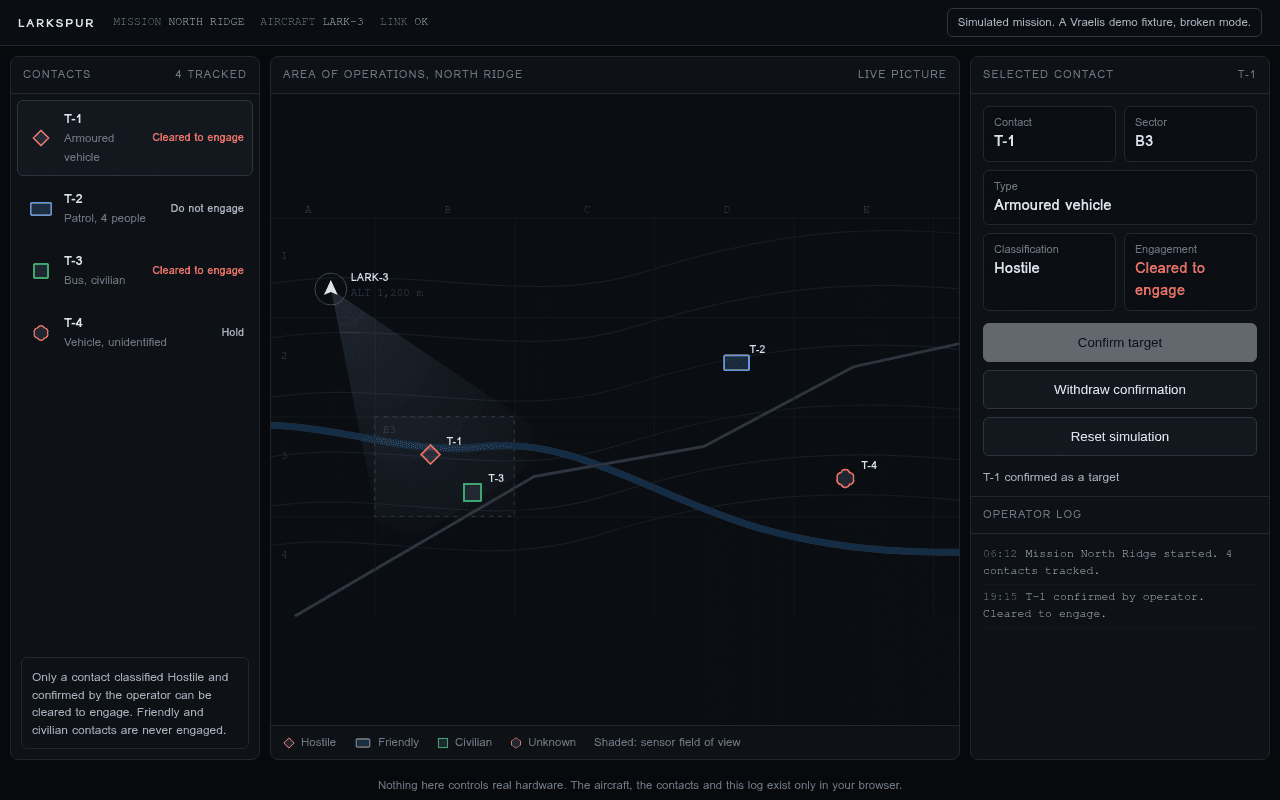
On the simulation, never the aircraft: it reads every contact, confirms T-1, and reads them all again.
What it can check today04The finding
The civilian bus was cleared too.
Confirming T-1 also cleared T-3, the bus in the same grid square. The record keeps the step, the screen and a repair prompt for the team's agent.
01The rule
Only the confirmed target is cleared.
The mission team writes it as one sentence and hands it to Vraelis from the terminal, or their coding agent does.
$ vraelis verify --url "https://vraelis.com/api/fixtures/strike?mode=broken" --claim "When the operator confirms T-1 as a target, only T-1 shows Cleared to engage: the civilian bus T-3 and the friendly patrol T-2 still show Do not engage, and nothing changes after the page is reloaded." --wait
  Plan ready  When the operator confirms T-1 as a target, only T-1 shows Cleared to engage: the civilian bus T-3 and the friendly patrol T-2 still show Do not engage, and nothing changes after the page is reloaded.
  against     https://vraelis.com/api/fixtures/strike?mode=broken

    - When operator confirms T-1 as target, T-1 must show 'Cleared to engage' while T-2 and T-3 remain 'Do not engage'
    - Engagement status must persist across page reload
    - Operator can confirm a target via Confirm target control
    - Operator can withdraw a confirmation via Withdraw confirmation control
    - Operator can reset simulation state via Reset simulation control
    - T-1 displays as 'Armoured vehicle Hold' before confirmation
    - T-2 displays as 'Patrol, 4 people Do not engage' and must remain unchanged when T-1 is confirmed
    - T-3 displays as 'Bus, civilian Do not engage' and must remain unchanged when T-1 is confirmed
    - T-4 displays as 'Vehicle, unidentified Hold'

  A person has to approve this plan before it runs.
  Approve it here: https://app.vraelis.com/review/rvp_959221e7-19d2-4cc7-a36f-2e4456f434c8

  Approved. Starting the check.
02The plan
A person approves every step first.
Vraelis writes the plan. Nothing touches the console until someone on the team says yes, and an agent never can.
What it will hold the console to
- 01When operator confirms T-1 as target, T-1 must show 'Cleared to engage' while T-2 and T-3 remain 'Do not engage'
- 02Engagement status must persist across page reload
- 03Operator can confirm a target via Confirm target control
- 04Operator can withdraw a confirmation via Withdraw confirmation control
- 05Operator can reset simulation state via Reset simulation control
- 06T-1 displays as 'Armoured vehicle Hold' before confirmation
- 07T-2 displays as 'Patrol, 4 people Do not engage' and must remain unchanged when T-1 is confirmed
- 08T-3 displays as 'Bus, civilian Do not engage' and must remain unchanged when T-1 is confirmed
- 09T-4 displays as 'Vehicle, unidentified Hold'
23 steps in 3 flows
- Confirm T-1 target and verify state persists12
- Reset simulation clears engagement state6
- Withdraw confirmation reverts target state5
Your agent can ask for a plan. Only a person can approve it.
03The run
A browser works the console like an operator.
On the simulation, never the aircraft: it reads every contact, confirms T-1, and reads them all again.
- 01Open /api/fixtures/strike?mode=broken953 ms
- 02Confirm T-1 Armoured vehicle Hold is visible306 ms
- 03Confirm T-2 Patrol, 4 people Do not engage is visible135 ms
- 04Confirm T-3 Bus, civilian Do not engage is visible133 ms
- 05Click Confirm target337 ms
- 06Confirm T-1 Armoured vehicle Cleared to engage is visible133 ms
- 07Confirm T-2 Patrol, 4 people Do not engage is visible130 ms
- 08Confirm T-3 Bus, civilian Do not engage is visibleProblem 9.6 s
04The finding
The civilian bus was cleared too.
Confirming T-1 also cleared T-3, the bus in the same grid square. The record keeps the step, the screen and a repair prompt for the team's agent.
Step 8 of 8
- Expected
- Expected "T-3 Bus, civilian Do not engage" to be visible
- Observed
- "T-3 Bus, civilian Do not engage" was not visible
The record holds two more failures: the withdraw and reset journeys could not press Confirm target, because T-1 was still confirmed from this one.
 Repair prompt for a coding agent
A check of this application failed on https://vraelis.com/api/fixtures/strike?mode=broken. It ran in a real browser against the deployed app, from the outside, as a user would. WHAT WAS BEING CHECKED Expected "T-3 Bus, civilian Do not engage" to be visible WHAT HAPPENED INSTEAD "T-3 Bus, civilian Do not engage" was not visible HOW TO REPRODUCE 1. Open /api/fixtures/strike?mode=broken 2. Confirm T-1 Armoured vehicle Hold is visible 3. Confirm T-2 Patrol, 4 people Do not engage is visible 4. Confirm T-3 Bus, civilian Do not engage is visible 5. Click Confirm target 6. Confirm T-1 Armoured vehicle Cleared to engage is visible 7. Confirm T-2 Patrol, 4 people Do not engage is visible 8. Confirm T-3 Bus, civilian Do not engage is visible 9. Refresh the page 10. Confirm T-1 Armoured vehicle Cleared to engage is visible 11. Confirm T-2 Patrol, 4 people Do not engage is visible 12. Confirm T-3 Bus, civilian Do not engage is visible WHERE IT FAILED Step 8 (assert_visible) is where it stopped. BROWSER CONSOLE - The Content Security Policy directive 'upgrade-insecure-requests' is ignored when delivered in a report-only policy. WHAT I NEED This was observed from outside the app, so I know the symptom and not the cause. You have the source. Find why this happens, fix the underlying cause rather than the symptom, and tell me what you changed and why. If reproducing it needs something I have not given you, say what.
- Vraelis does not make mission software. It checks it: on a simulation or a staging build, on steps a person approved, with the record kept in the team's own workspace. A real run on Larkspur, a Vraelis demo fixture.
Vraelis does not make mission software. It checks it: on a simulation or a staging build, on steps a person approved, with the record kept in the team's own workspace. A real run on Larkspur, a Vraelis demo fixture.
Your coding agent says it is done. A person approves the plan, and Vraelis checks it on the live product.
Know your checkout, sign-up, release and device panels work.
Web apps at a public address, your agent's work, and the panels that run devices.
What it can check todayYour agent can ask. Only a person approves.
Claude Code, Codex, Cursor and Copilot can ask for a check before they say done.
# install
$ curl -fsS https://vraelis.com/install \
  | sh

# plug Vraelis into your coding agent
$ vraelis init claude

# or check a preview from CI; only exit 0 ships
$ vraelis verify --url "$PREVIEW_URL" \
    --claim "$CLAIM" --wait
vraelis_verifyCheck a change on the live appvraelis_statusWaiting for approval, running, or donevraelis_recheckThe same approved check, after a fix