
Skip to content
Vraelis
Pricing
Sign inCreate account
A truck on a road at dusk.

Robotics, drones and fleets

Check the panel that runs the fleet

Say what an operator action should do, such as Return home. Vraelis presses it in a real browser and checks what the panel reports afterwards, including after a reload.

Talk to us→→Try the fixture

The problem

Acknowledged is not executed

01

The panel confirms the wrong unit

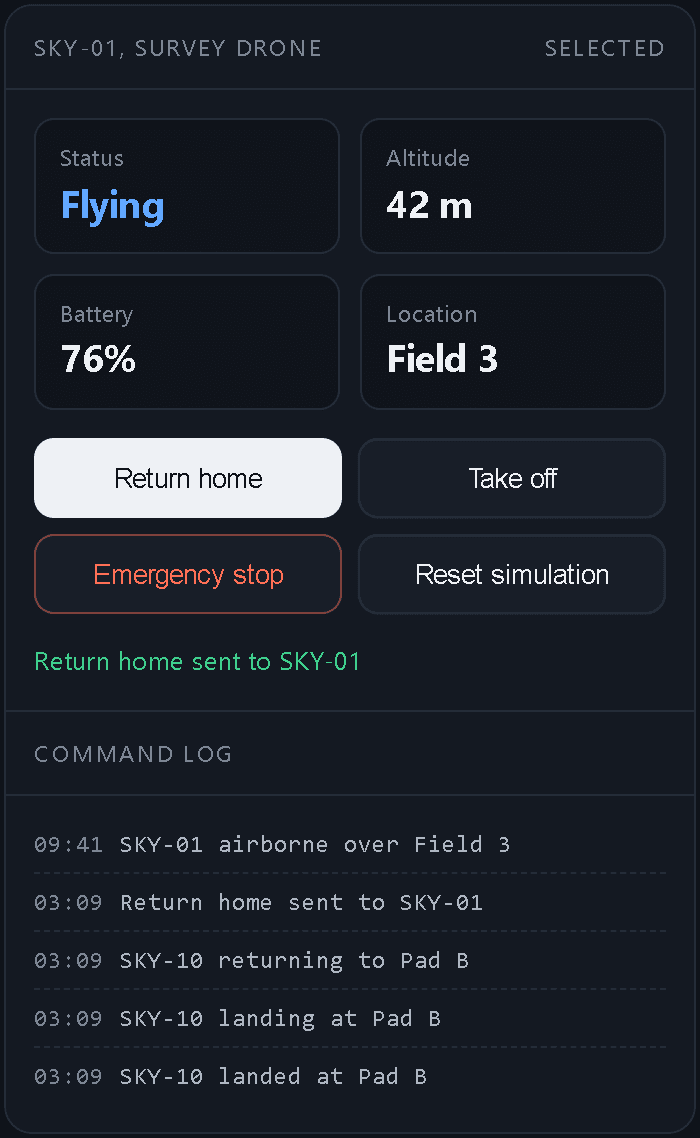
The panel says Return home sent to SKY-01. Afterwards SKY-01 still shows Flying and SKY-10 shows Landed. Fieldline's broken mode has exactly this bug.

02

The state does not survive a reload

A status that is right until the page reloads is a status the next operator never sees.

03

One action changes more than it should

On Larkspur, confirming one contact cleared every contact in its grid square.

Try it

Press Return home

Fieldline is a simulated fleet console Vraelis serves for checks like this one. Nothing here is a real aircraft.

The sentence for this fixture (not run yet)

After the operator presses Return home for SKY-01, SKY-01 shows Landed at Pad A, and still does after a reload.

Fieldline in its broken mode after pressing Return home for SKY-01: SKY-01 still shows Status Flying, the panel says Return home sent to SKY-01, and the command log shows SKY-10 returning, landing and landed at Pad B.
Open the broken console→Open the fixed console→

The record

A real check of a drone mission console

Larkspur is a simulated mission console Vraelis built. Confirming one target also cleared the civilian bus in the same grid square.

Larkspur

Confirming T-1 changed more than T-1. In its broken mode Larkspur clears every contact in the confirmed contact's grid square, and the civilian bus T-3 is in that square. The check read the contacts again after the click, so it saw the bus. A check of T-1 alone would have passed.

Outcome
Found a problem
Run ID
vrf_51705517
Recorded
2026-10-02
Duration
40.8 s
Read the whole record→
The sentence, the steps and the finding
When the operator confirms T-1 as a target, only T-1 shows Cleared to engage: the civilian bus T-3 and the friendly patrol T-2 still show Do not engage, and nothing changes after the page is reloaded.

Approved by a person, October 2, 2026, 02:03 UTC

Confirm T-1 target and verify state persists

  1. 01Open /api/fixtures/strike?mode=broken953 ms
  2. 02Confirm T-1 Armoured vehicle Hold is visible306 ms
  3. 03Confirm T-2 Patrol, 4 people Do not engage is visible135 ms
  4. 04Confirm T-3 Bus, civilian Do not engage is visible133 ms
  5. 05Click Confirm target337 ms
  6. 06Confirm T-1 Armoured vehicle Cleared to engage is visible133 ms
  7. 07Confirm T-2 Patrol, 4 people Do not engage is visible130 ms
  8. 08Confirm T-3 Bus, civilian Do not engage is visibleFound a problem9.6 s

Step 8 of the first journey

Expected
Expected "T-3 Bus, civilian Do not engage" to be visible
Observed
"T-3 Bus, civilian Do not engage" was not visible

The record holds two more failures: the withdraw and reset journeys could not press Confirm target, because T-1 was still confirmed from this one.
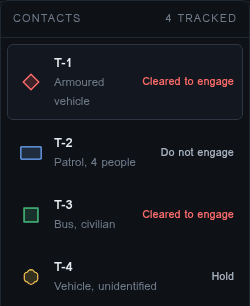
The run's screenshot of Larkspur's contact list after confirming T-1: T-1 and the civilian bus T-3 both show Cleared to engage, T-2 shows Do not engage and T-4 shows Hold.

Examples, none of these has been run yet

  1. 01

    After the operator presses Return home for SKY-01, SKY-01 shows Landed at Pad A, and still does after a reload.

  2. 02

    Emergency stop on one aircraft leaves every other aircraft's status unchanged.

  3. 03

    A robot's schedule edited in the dashboard shows the new start time after a reload.

  4. 04

    The fleet map lists every vehicle the operator's role can see, and no others.

How it fits

Through the panel, today

What the panel shows

Vraelis reads what the panel shows after the action: the status, the location and the log. Reading the device itself is not built yet.

A person approves every plan

Nothing presses a button until someone on your team approves the exact plan. An API key cannot approve one.

Simulation first

Point it at a simulator or a staging panel first. The panel needs a public https address and a test sign-in.

Limits

What it does, and what it does not

What it does

  1. 01Presses the operator action in the panel, in a real browser.
  2. 02Reads what the panel reports afterwards, including after a reload.
  3. 03Records every step and the screen, and writes a repair prompt.

What it does not do

  1. 01Read the device itself: firmware, sensors, telemetry (not built yet).
  2. 02Check native or desktop apps (not built yet).
  3. 03Reach private networks or localhost.
  4. 04Certify a vehicle, or its panel, for use.
Read the limitations→

Related

  • Defense

    Mission consoles, checked on a simulation or staging build.

    →
  • What it can reach

    Web apps, and devices through the panels that run them.

    →
  • The full Larkspur record

    The sentence, the plan, every step and the finding.

    →

Point it at your fleet's panel

Talk to us→→

Product

PlatformHow a check worksWhat it can reachWhat is builtIntegrationsAI assistantsPricing

Solutions

DefenseRobotics and fleetsFintech and commercePublic sectorAI-built appsSaaS product teamsAgenciesEnterpriseAll solutions

Developers

DocumentationAPICLIWebhooksCIDevelopers overview

Resources

ResearchUse casesMethodIn publicREADMEChangelog

Company

AboutContactReddit partnershipByteDance partnership

Trust

SecurityLimitationsPrivacyCookiesTermsAcceptable useRefundsData rightsSubprocessorsTrademark

Vraelis checks whether live software does what someone says it does, and shows the evidence.

© 2026 Vraelis
Image sourcesLinkedIn